Pay With Crypto on Culturemized: Step-by-Step Guide (2026)

Why Culturemized accepts crypto
The world moves fast, and Culturemized moves faster. Traditional banks delay, decline, or limit payments, but your Culture should never wait for approvals.
That is why Culturemized now accepts cryptocurrency payments, so you can pay with Bitcoin, USDT and 300+ supported coins from anywhere, directly on the Culturemized store checkout.
What you need before you start
Before you pay with crypto on Culturemized, make sure you have:
A crypto wallet or exchange app (Binance, Bybit, Trust Wallet, Coinbase, etc.) with enough balance
Network fees covered (e.g. a little extra BTC, ETH, or USDT for gas)
Stable internet and access to your email or phone for order confirmation
Culturemized uses a trusted crypto payment gateway (NOWPayments) to generate a unique payment address and amount for each order, so your transaction is secure and automated.
Steps to pay with crypto on Culturemized
Step 1: Add your favorite pieces to cart
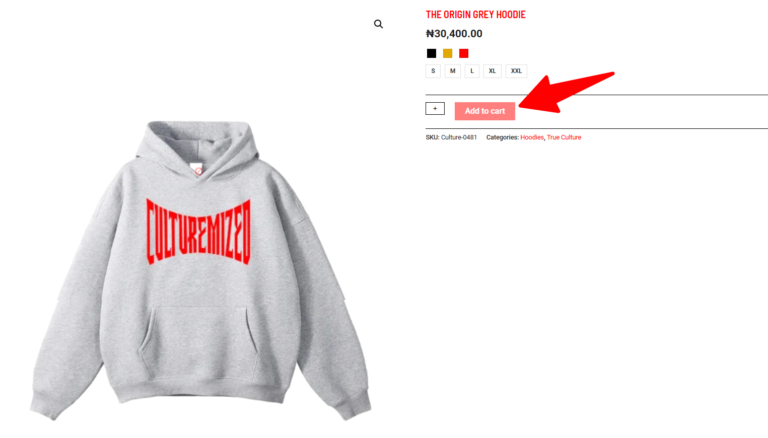
Visit the Culturemized shop and browse hoodies, sweatshirts, sweatpants, shorts and sets.
Select your size, preferred color and quantity, then tap “Add to cart”.
When you are done shopping, open your cart and tap “Proceed to checkout”.
Double-check your size and color before you go forward, because every piece is Exclusive and all sales are final on Culturemized.
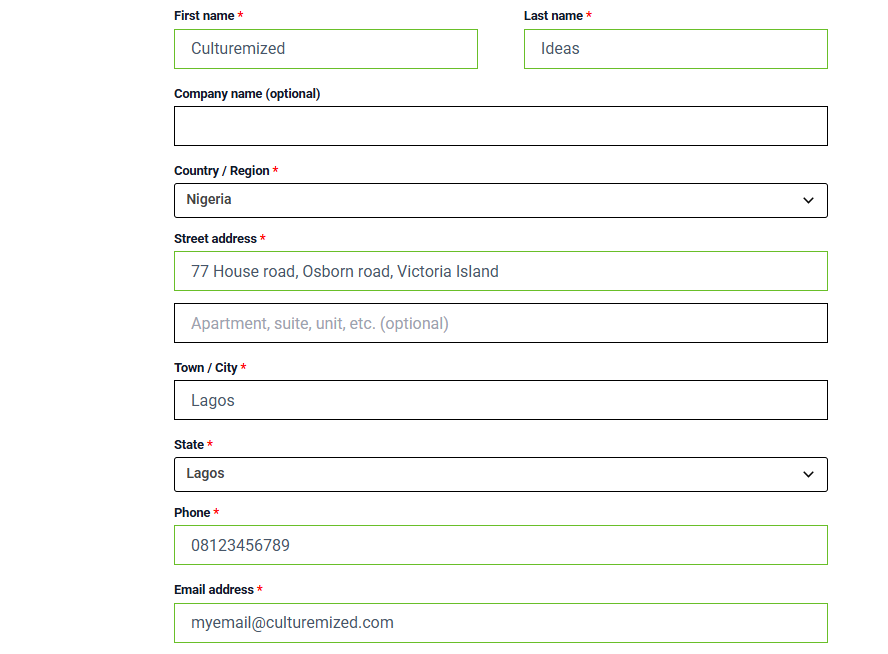
Step 2: Enter your shipping and contact details
On the checkout page, fill in your full name, email, phone number, and shipping address.
Make sure your address, email and phone number are accurate so delivery is smooth.
Confirm the order summary: items, quantities, and total amount in your local currency (₦ or equivalent).
This information is what Culturemized uses to ship your order and send your order confirmation and updates.
Step 3: Choose “Pay with Crypto” at checkout
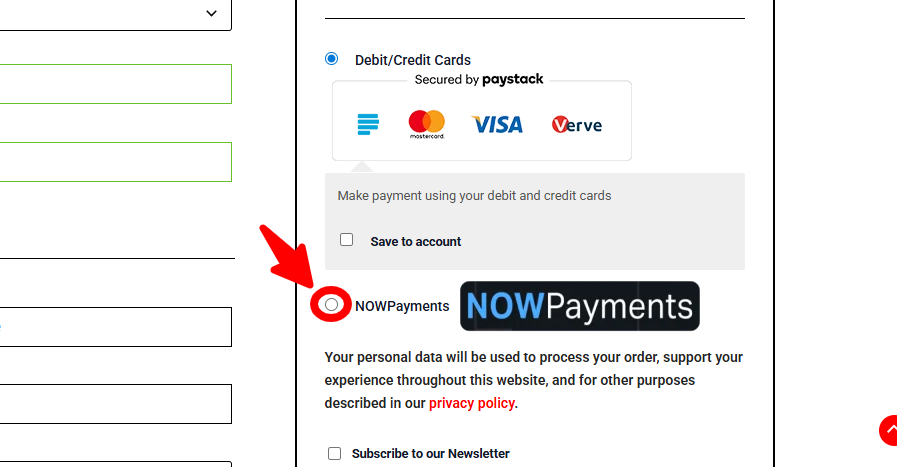
In the payment methods section, look for the crypto payment option (powered by NOWPayments or similar gateway).
Select “Pay with Crypto” as your payment method.
Click the button to place your order and generate the crypto invoice.
Once you confirm, Culturemized’s payment gateway will create a unique invoice page just for your order.
Step 4: Select your coin (Bitcoin, USDT & more)
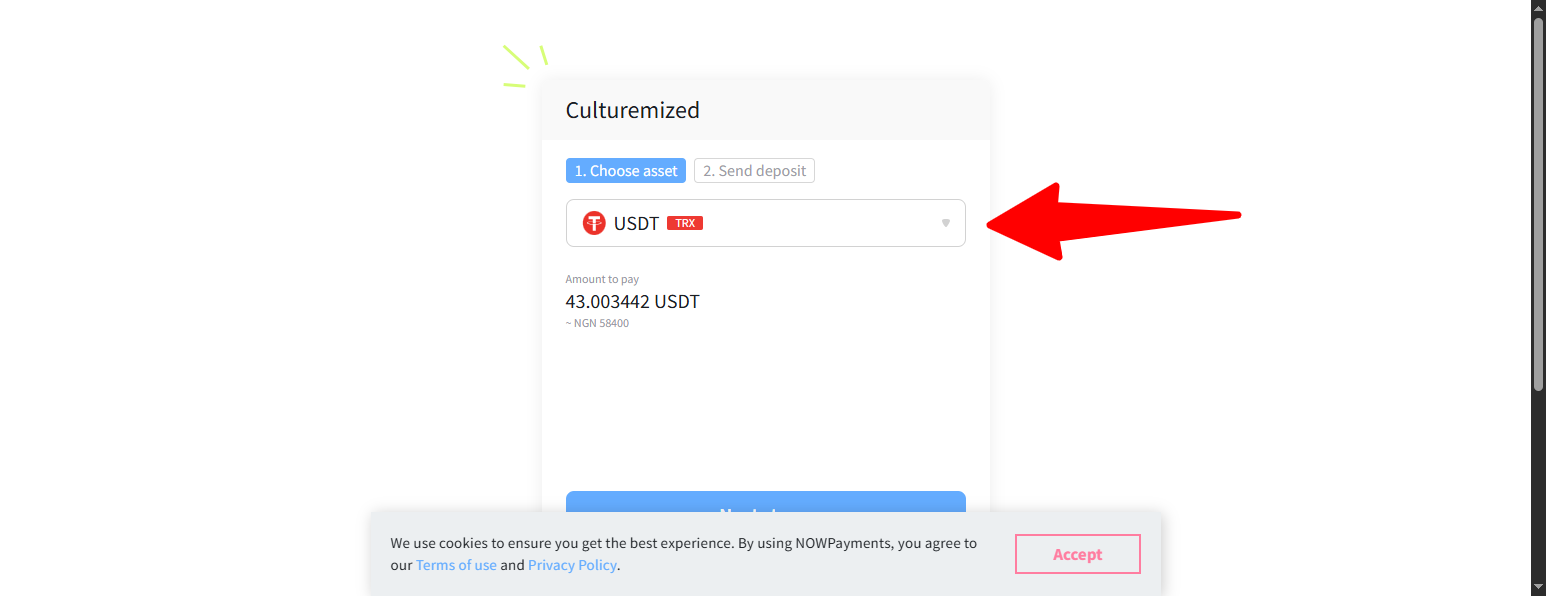
On the crypto invoice page you will see:
The total amount converted into crypto (for example: 0.0005 BTC or 20 USDT).
A list of supported coins and networks (Bitcoin, USDT, ETH and 300+ other cryptocurrencies).
A countdown timer showing how long the rate is valid (for example 15–30 minutes).
Choose your preferred coin and network (for example, USDT TRC20 if you are sending from a TRON-based wallet).
Step 5: Copy the address and exact amount
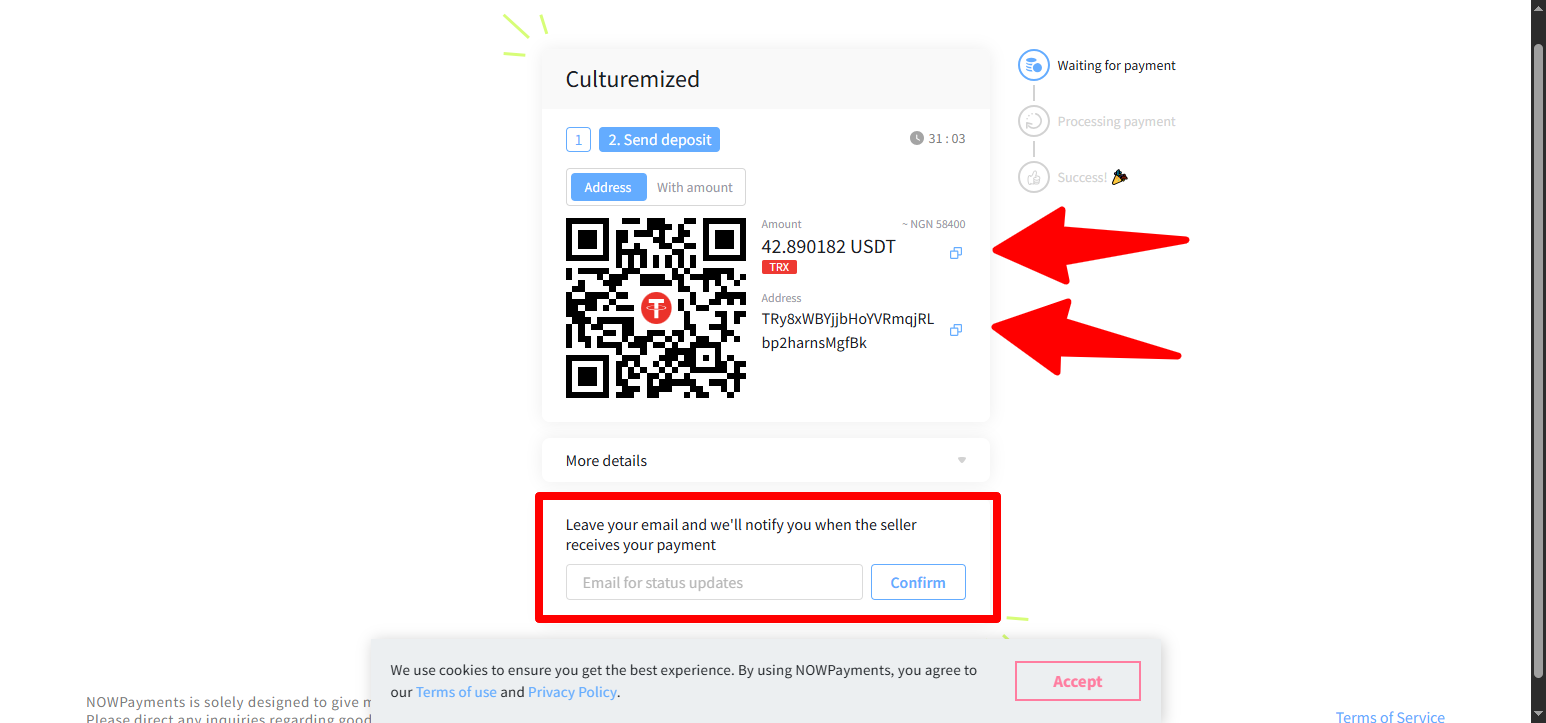
The invoice will display:
A unique wallet address for your selected coin.
The exact amount you must send (e.g. 19.87 USDT, not “around 20”).
Then:
Click “Copy address” to copy the wallet address.
Click “Copy amount” (if available) to avoid typing errors.
Sending the exact amount to the exact address is critical so your payment is detected and confirmed automatically.
You can also add your email to be notified. This is optional but tottally advisable.
Step 6: Pay from your wallet or exchange
Open your crypto wallet or exchange app:
Choose the same coin and network you selected on the invoice (e.g. USDT TRC20).
Tap “Send”, paste the wallet address, and paste or type the exact amount.
Check the network fee and make sure your total balance covers amount + fee.
Confirm the transaction. Once you send, your payment will appear on the blockchain and start confirming.
Step 7: Wait for confirmations (do not close the page)
After sending:
Return to the Culturemized crypto invoice page.
The status will change from “Waiting for payment” to “Payment detected / Confirming” and then “Payment confirmed / Complete”.
This can take a few minutes depending on the network congestion and coin you used.
Do not close the invoice page until it shows “Payment confirmed” or similar success status.
Step 8: Order confirmation from Culturemized
Once your payment is confirmed:
Culturemized will receive the payment and mark your order as paid.
You will see an on-screen confirmation and receive an order confirmation email with your order number and details.
Your order will move into processing and then be prepared for shipping.
Culturemized prides itself on exclusive, made-for-you pieces, so processing time reflects quality and attention to detail
Supported cryptocurrencies on Culturemized
Through the crypto gateway, Culturemized can accept:
Major coins: Bitcoin (BTC), Ethereum (ETH), Litecoin (LTC).
Stablecoins: USDT, USDC and other popular stablecoins on networks like TRON, Ethereum, BNB Chain, etc.
300+ supported cryptocurrencies, depending on the gateway list at the time of your purchase.
The invoice will always show you the currently available options when you are checking out.
Common issues and how to fix them
1. I sent the payment but the invoice is still “waiting”.
Wait a few more minutes; some networks need more confirmations.
Check that you selected the correct network (e.g. TRC20 vs ERC20).
2. I sent less than the required amount.
Underpayments may not be confirmed automatically.
Contact Culturemized support with your order number and transaction ID so the team can review.
3. My payment expired before I sent it.
If the timer ran out, the rate may no longer be valid.
Create a fresh order on Culturemized and generate a new crypto invoice, then pay within the countdown time.
Safety tips when paying with crypto
Always confirm you are on the official Culturemized website (check the padlock icon and the culturemized.com domain).
Never share your wallet’s private keys or seed phrase with anyone.
Double-check the recipient address and coin/network before tapping “Send”.
Crypto payments are designed to be irreversible, so a careful double-check keeps your funds and your True Culture safe. Learn more Cryptocurrency Safety tips.
Final Call - Get Culturemized
the future is already here. Your True Culture should not wait on bank limits, card declines, or international borders.
Load your wallet, pick your pieces, and pay with crypto on Culturemized today. DON’T STOP your Culture.